

Time You Can Take Straight to Payroll

Time Trials turns everyday time tracking into clean, payroll-ready records. Your team clocks in and out with one click from anywhere in Racing Snail, lunch is deducted automatically, and every pay period is created, approved, and locked for you — with estimated gross pay at a glance and paid time off the whole team can see. No spreadsheets. No highlighter. No surprises after the numbers go to payroll.

Time You Can Take Straight to Payroll
Ditch the Spreadsheets. Retire the Highlighter.

Ditch the Spreadsheets. Retire the Highlighter.

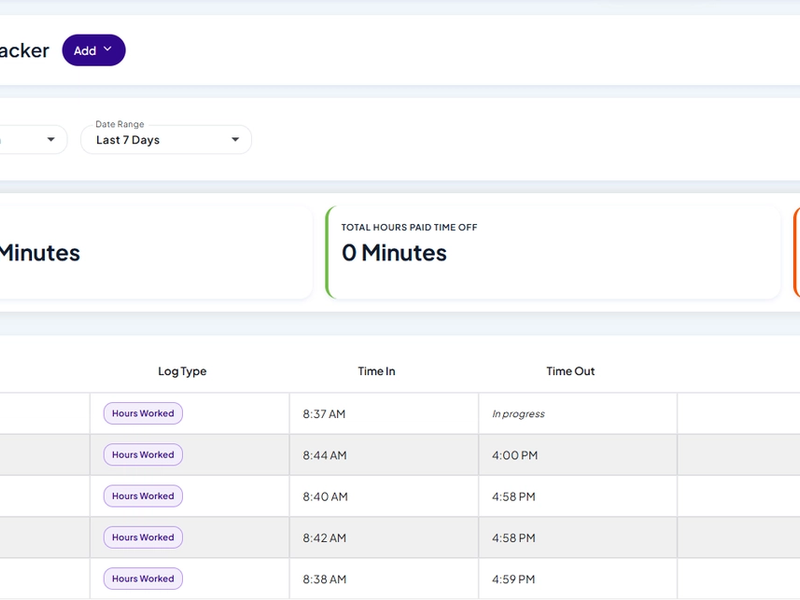
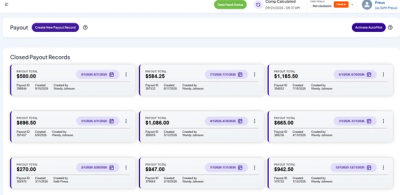
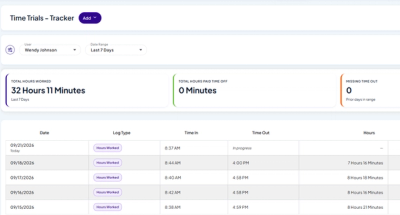
Most agencies still track hours in a spreadsheet, then chase down corrections, then hope nobody edits a number after it’s been sent to payroll. Time Trials replaces all of that with one screen your team already understands — modeled on Racing Snail’s Payout Records. Clocking in takes one click from anywhere in the app, lunch comes out on its own, and the current pay period sits right at the top with live totals through today. Once you approve a period, the numbers are locked. That’s the difference between a report you glance at and numbers you can trust.

Built for How Your Team Actually Works

Tracking time should be the easiest part of the day. Time Trials makes clocking in, taking lunch, and requesting time off effortless — so the record fills itself in.

Clock in from anywhere, in one click

Clock in from anywhere, in one click

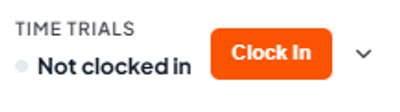
Starting and stopping the clock is a single button, pinned to the top of the Racing Snail toolbar with a live status right beside it — so wherever someone is in the app, they can see at a glance whether they're on the clock and start or stop with one click. No page to navigate to, nothing to hunt for. Clocking in is the easiest thing your team does all day.

Automatic lunch deductions — nothing to remember

Automatic lunch deductions — nothing to remember

Set a lunch deduction once and Time Trials takes the break out automatically, so nobody has to clock out and back in for lunch. You choose the duration. This was the single most-requested improvement from the first version of Time Trials: agencies told us they didn't want their teams tripped up by forgetting to clock out for a break — now they don't have to.

Real PTO requests, approvals, and balances

Real PTO requests, approvals, and balances

Paid time off works as a real request flow in a dedicated Time Off tab. Team members see their balances by bucket (PTO, sick, and any others you set up) and submit requests; approvers get alerts and approve or deny with a note; approved time off flows into the tracker and reports automatically, with an audit trail of who approved what. Balances stay simple — you set each person's bank (say, 120 hours on January 1) and requests draw it down — so "how much time off do I have left?" is answered without digging through email.Paid time off works as a real request flow in a dedicated Time Off tab. Team members see their balances by bucket (PTO, sick, and any others you set up) and submit requests; approvers get alerts and approve or deny with a note; approved time off flows into the tracker and reports automatically, with an audit trail of who approved what. Balances stay simple — you set each person's bank (say, 120 hours on January 1) and requests draw it down — so "how much time off do I have left?" is answered without digging through email.

Hours You Can Take Straight to Payroll

When the period ends, the numbers are clean, locked, and kept — ready for whatever payroll system you run.

Pay periods that run themselves

Pay periods that run themselves

Set your pay schedule once — monthly, twice a month (say the 1st and the 15th), or every two weeks — and Time Trials creates a record for every pay period automatically from then on. Nothing to run, nothing to create by hand. The current period is always right at the top with live totals through today.

Approve the period, and the numbers lock

Approve the period, and the numbers lock

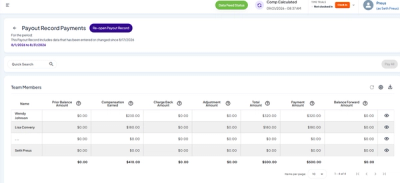
Review a period and approve it — one team member at a time, or the whole team at once — with anything that needs a second look (a missed clock-out, a still-pending time-off request) flagged before you sign off. Approving locks those hours and PTO so nothing changes after it's gone to payroll, and every approval is stamped with who made it. The record is complete once everyone in it is approved, and you can approve as soon as the period's ready — even a day or two early.Review a period and approve it — one team member at a time, or the whole team at once — with anything that needs a second look (a missed clock-out, a still-pending time-off request) flagged before you sign off. Approving locks those hours and PTO so nothing changes after it's gone to payroll, and every approval is stamped with who made it. The record is complete once everyone in it is approved, and you can approve as soon as the period's ready — even a day or two early.

Estimated gross pay, right on the record

Estimated gross pay, right on the record

Every period shows an estimated gross pay total per team member, calculated from the hourly wage on file. It's clearly flagged as an approximation — rounding, missed clock-outs, and retroactive time off can all move the final figure — and it's there for planning and insight, before taxes and withholding. Your payroll system stays the system of record.

A permanent record of every period

A permanent record of every period

The Time Trials Records screen keeps every period in one place: the current period on top with live totals, anything awaiting approval next, and a full, permanent history of approved periods below. Each period is a card showing its dates, total hours, and estimated gross pay — and any card opens into its complete report: summary stat cards (total hours, estimated gross pay, PTO, missing clock-outs) above a per-person breakdown of hours, rate, and estimated gross pay. It's a look-back-anytime record of exactly what was tracked and approved, with nothing to archive or reconstruct.The Time Trials Records screen keeps every period in one place: the current period on top with live totals, anything awaiting approval next, and a full, permanent history of approved periods below. Each period is a card showing its dates, total hours, and estimated gross pay — and any card opens into its complete report: summary stat cards (total hours, estimated gross pay, PTO, missing clock-outs) above a per-person breakdown of hours, rate, and estimated gross pay. It's a look-back-anytime record of exactly what was tracked and approved, with nothing to archive or reconstruct.

The flexible report you already know — still here

The flexible report you already know — still here

Pay periods are for running payroll. The free-form report is for everything else: pick any date range and see hours across it, unlocked and unrestricted, whenever you want.

Put hours next to results in Vital Stats

Put hours next to results in Vital Stats

Hours become an option in Vital Stats reporting, so you can line up hours worked against production and activities and see effort against results per team member. Hours only — no rates, no pay data — so it's safe for the wider team that already lives in Vital Stats.

Set It Once. Time Trials Takes It From There.

Four steps from “hours tracked” to “numbers you can trust.”

1

Step 1
Set your pay schedule

Choose monthly, twice a month, or every two weeks in a one-time setup screen. Set your work-week and your automatic lunch deduction here too.

2

Step 2
Your team clocks in and requests PTO

Clocking in and out is one click from a button pinned to the top of the Racing Snail toolbar, so there's no page to find. Lunch is deducted automatically, and time-off requests flow in as people submit them. Corrections are made at the source, so the record stays clean.

3

Step 3
Review and approve

When the period ends (or a day or two early), approve it in one action. That locks the hours and PTO inside the date range.

4

Step 4
Hand payroll numbers you can trust

Approved totals — including estimated gross pay per person — are ready for whatever payroll system you run, and every period is kept as a permanent record. The same hours show up in Vital Stats for coaching.

A Better Way to Get to Payroll Day

BEST FOR

Agencies still tracking hours by hand

The Manual Way

Spreadsheets, highlighters, and hope

Key Features

  • Build a new timesheet every pay period
  • Chase down corrections by hand
  • Numbers can change after they reach payroll
  • PTO balances live in email threads
  • Remember to clock out for lunch

BEST FOR

Agencies that want hours they can trust

Recommended

Time Trials

Payroll-ready hours, built into Racing Snail

Key Features

  • Pay periods created automatically on your schedule
  • One-click clock in/out from anywhere, plus automatic lunch
  • Approve to lock the period — one source of truth
  • Self-serve PTO balances in the Time Off tab
  • Hours line up next to production in Vital Stats

Questions Agencies Ask About Time Trials

Make Payroll Day Boring — in the Best Way

See how Time Trials turns tracked time into payroll-ready numbers your whole agency can trust.

Ready to trust your hours?

Schedule a demo